
Autopayments in the contractors personal account
What are autopayments?
Autopayments are automatic transfers of funds from a contractor’s balance to the selected payment details once the minimum limit for that payment method is reached. This feature allows you to receive payouts without submitting a manual request.
How do I enable autopayments?
- Go to your contractor account.
-
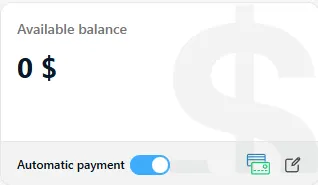
In the Finance section of the balance page, switch Autopayments to On.
-
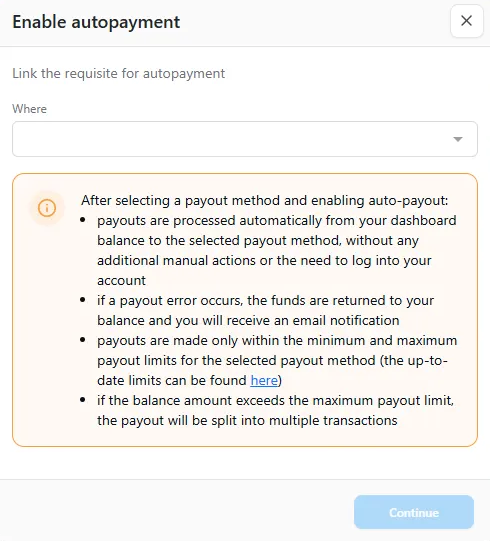
Select the payment details to which the payout will be sent.
- Make sure your balance reaches the minimum limit for the selected payment method and currency.
Once enabled, autopayments will run automatically.
To disable autopayments, switch Autopayments to Off. After disabling, funds will continue to accumulate on your balance.

How do autopayment limits work?
- If the balance is below the minimum limit, the autopayment will not be processed.
- If the balance exceeds the maximum limit, the payout amount will be automatically split into multiple transactions until the full balance is paid out.
Using autopayments together with manual payouts
- Enabling autopayments does not restrict the use of manual withdrawals.
- Manual withdrawals are available via the Request payout button.
- A manual payout can be requested if the autopayment has not yet been processed.
- Autopayments are triggered automatically within 10–15 minutes after funds are credited to the balance.
What happens if an autopayment fails?
If an error occurs during an autopayment:
- Autopayments are automatically disabled.
- An email with details about the failed payout is sent to your email address.
- Once the issue is resolved, the contractor can enable autopayments again.
How do I change payment details for autopayments?
If autopayments are already enabled and you want to change the payment details:
- Click the Edit icon in the autopayments section.
- In the modal window, select any payment details added to your contractor account.
- Save the changes.
Autopayments for self-employed contractors
When processing a payout for self-employed contractors, the service used for generating the receipt is always taken from the most recently completed task.
If you need to manually select services for making a payout and generating a receipt, please use the withdrawal request via the form.
To enable automatic payouts under the Self-Employed tax status, you must receive at least one task from a customer. The service from that task will then be used for receipt generation going forward.